Mostrando entradas con la etiqueta Cortafuegos. Mostrar todas las entradas
NAXSI is an open source, high performance, low rules maintenance, Web Application Firewall module for Nginx, the (in)famous web server and reverse-proxy.

 ¿Qué es un WAF?
A web application firewall (WAF) is an appliance, server plugin, or filter that applies a set of rules to an HTTP conversation [OWASP]...
Es un cortafuegos especialmente diseñado para operar con tráfico web (HTTP), que es capaz de detectar los ataques más comunes como son XSS, CSRF, SQLInyection, etc.. Es lo que se denomina protección contra "web attacks" de manera dinámica, siendo capaz de detectar o incluso bloquear este tipo de ataques.

Funcionamiento

Lo mas interesante de NAXSI, a parte de su integración con nginx es un servidor web y proxy-inverso de alto rendimiento, es su modo de operación basado en el aprendizaje del comportamiento natural del website, reduciendo a la mínima expresión los falsos positivos.
Set the module in learning mode, crawl your site, and it will generate the necessary white lists to avoid false positives! Naxsi doesn't rely upon pre-defined signatures, so it should be capable to defeat complex/unknown/obfuscated attack patterns.[NAXSI]
El sistema que utiliza para operar es "Listas blancas", es decir, se bloqueado absolutamente todo salvo lo que se ha identificado como "tráfico correcto / autorizado" que se añade a la lista blanca.

Conclusiones

Es un excelente complemento para proteger tus Sistemas, solución de "bajo coste" que aporta una protección extra a tus websites! Recomendamos, utilizar el módulo y probarlo por uno mismo.

Algunos datos de intereses sacados de su página demuestran su rendimiento ante un análisis de vulnerabilidades. Ver el resultado de los test realizados en el siguiente enlace:


Fuente | NAXSI Website 
Sometimes, when I wanna improve the security in windows system, and I start playing with firewall outbound rules. The normal working in windows firewall is permit all outbound connections, it's insecure configuration. But it is the default security policy.

Background

I have at least three (3) browser installed in my Windows 7, one of this is Google Chrome, to my surprise when I was to add outbound firewall rule and obtained the following error message:
Error 138 (net::ERR_NETWORK_ACCESS_DENIED): Unable to access the network.

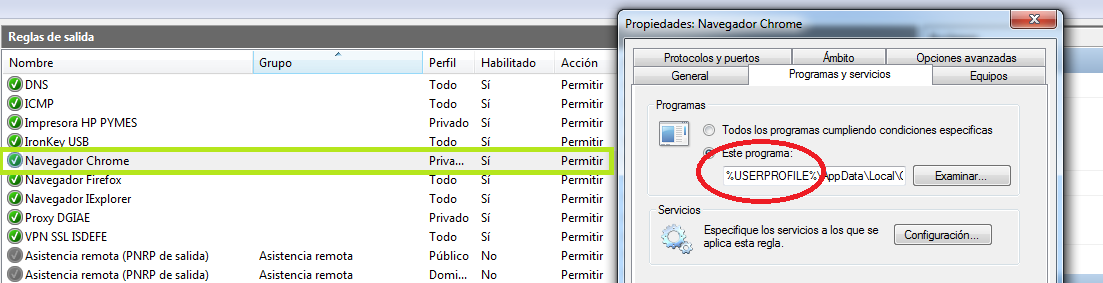
This error Why? I can't understand anything, How can it be? All is correctly configured, there was added a specific firewall rule to permit outbound traffic for any connection from Google Chrome program (Look the picture below).

Windows 7 Firewall Rule (Spanish text).
Especially when I had the same firewall rule to Firefox browser, and it working well! What is happening?

The Problem is in the Path

I had to research the origin of problem and I find out the problem with directory path! wo!... The problem lies in the path of executable program. It seems the windows firewall don't allow to add rules with different path than %PROGRAM FILES%.

This mechanism is to block the virus / malware behavior, Seriously? Can anyone belive that? I sincerely think that behavior is a error of windows firewall, because what prevents a virus installed in any directory path.

Solution


When the Google Chrome is tipically installed, it place in the following path:

%USERPROFILE%\AppData\Local\Google\Chrome\Application\chrome.exe

To change this path, it is neccesary to donwload a MSI packaged!

%PROGRAM FILES%\Google\Chrome\Application\chrome.exe

Donwload MSI Google Chrome

With, this new path the firewall rules works well.

Optionally, it can be setting up a specific protocol to restrain the traffic type, for example, it configure to TCP by 80 and 443 destination port.